- Home
- Taxi SMS and email
Texts and emails that sound like your office
CDS texts passengers and drivers at every step of a trip, in words you write. Customers’ replies come back to an inbox, and trip emails go from your own address.
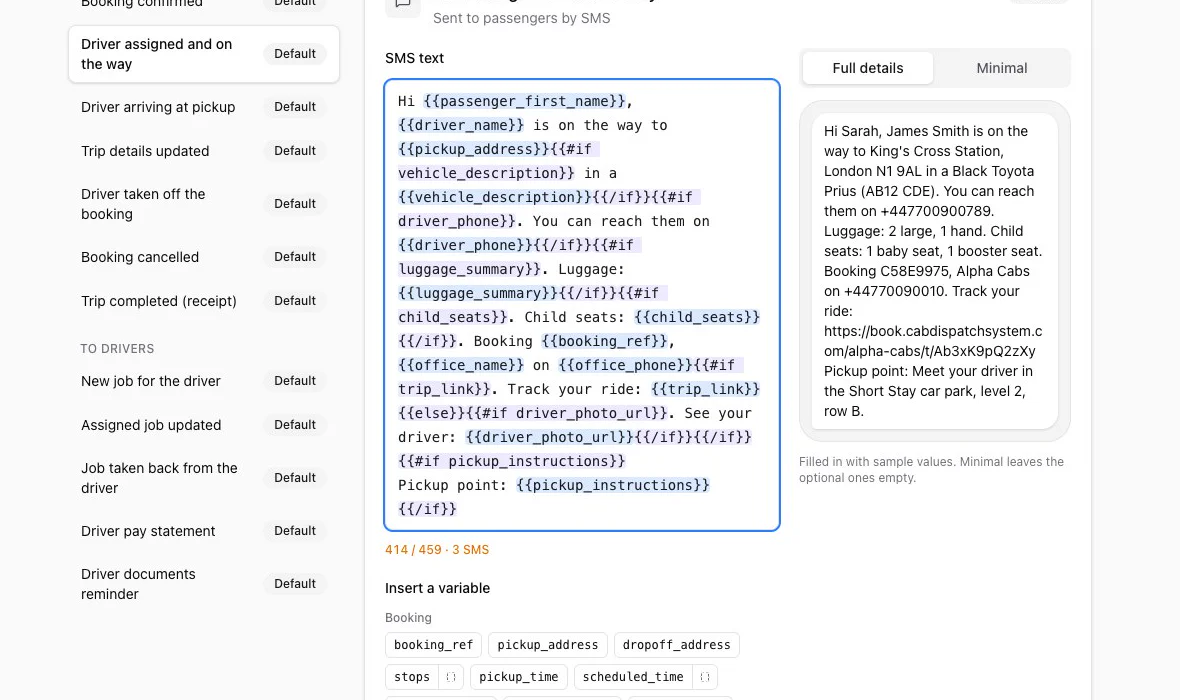
Real CDS screen with sample data.
Taxi booking confirmation SMS, and every text after it
Each message starts from a sensible default. Change the wording, add placeholders like the driver’s name or the pickup time, and see a preview with the number of SMS parts as you type.
- To passengers: booking confirmed, driver assigned and on the way, driver arriving, trip details updated, driver taken off, booking cancelled, trip completed
- To drivers: new job, job updated, job taken back
- Switch each message on or off, or stop all texts at once
Hi Hannah, Marcus Bell is on the way to London Kings Cross Rail Station in a Toyota Corolla Hybrid LB23 KXT. Booking C79518A8, Alpha Cabs. See your driver: app.cabdispatchsystem.com/d/7Hq2mXk4Pa
Sample message.
Passengers see who’s coming
The driver-on-the-way text can carry a link to a page with the driver’s name and photo, the car and its photo, the registration and the booking reference.
- Shows “On the way to you”, “Arriving now” or “On your trip”
- Never shows the driver’s phone number or address
- Stops working when the trip ends or another driver takes it
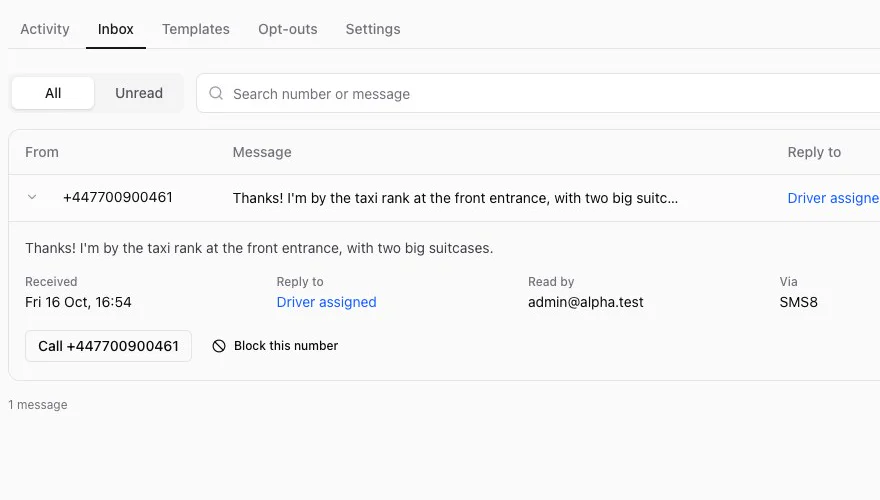
Replies land in your inbox
When a customer texts back, the reply appears in CDS with the message it answered. Call them back or block the number from there.
- An opt-out list for numbers that should never get texts
- Block whole prefixes, such as landlines or premium-rate numbers
- Delivery status for texts sent from an Android phone: sent, on the phone, delivered
SMS providers
SMS Gateway for Android (a free app on your own phone and SIM), SMS8, The SMS Works or Twilio. You pay your provider directly.
Formatted trip emails from your own address through Gmail, Microsoft 365, Brevo, Amazon SES or other SMTP. Replies come to you. Outlook.com and Hotmail addresses can’t send.
More ways to keep in touch
Trip texts always go out first, so a broadcast or a campaign never holds up a booking.
Message drivers
Text all your drivers or a chosen few, now or at a set time, with saved messages for the ones you send often.
Customer campaigns
Seasonal greetings and offers to your customers, with quiet hours, pause and resume. Every text ends “Reply STOP to opt out”.
Driver statements
Weekly pay statements by text and email, sent by hand or automatically every Monday.
Related features
Set up in one call
Your setup includes a 30-minute screen-share to connect your SMS and email.